| Lesson 8 | Building the use case diagram |
| Objective | Build a use case diagram based on user interviews. |
Building the Use Case Diagram based on user Interviews
You saw all the use case diagram notation in the previous lessons.
What you have not seen is how to build the diagram using a problem description. Use the simulation applet to step through a sample build process for the use case diagram using the following problem statement.
What you have not seen is how to build the diagram using a problem description. Use the simulation applet to step through a sample build process for the use case diagram using the following problem statement.
Conducting the User Interview
Our bank wants to redesign our checking account system to find opportunities to take advantage of new technologies.
By improving the system, we hope to provide our customers with more options for using their checking accounts.
"Currently, customers are required to use our tellers to make deposits and withdrawals. With ATMs and home banking, customers should be able to perform these transactions themselves. Furthermore, we should be able to make transfers between checking and savings types of accounts simpler too. Our bank staff will still need to be able to make adjustments. You know how unreliable computer systems are."
"Please do not forget that our preferred customers do not have any holds placed on their deposits. All preferred customer deposits clear immediately. It would be a disaster if the new system changed this rule."
"Currently, customers are required to use our tellers to make deposits and withdrawals. With ATMs and home banking, customers should be able to perform these transactions themselves. Furthermore, we should be able to make transfers between checking and savings types of accounts simpler too. Our bank staff will still need to be able to make adjustments. You know how unreliable computer systems are."
"Please do not forget that our preferred customers do not have any holds placed on their deposits. All preferred customer deposits clear immediately. It would be a disaster if the new system changed this rule."
UML is silent on the content of a use case but does provide a diagram format for showing them, as in Figure 1. Although the diagram is sometimes useful, it is not mandatory. In your use case work, do not put too much effort into the diagram. Instead, concentrate on the textual content of the use cases.
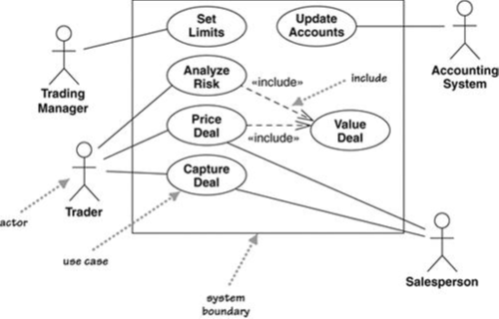
The best way to think of a use case diagram is that it is a graphical table of contents for the use case set.
It is also similar to the context diagram used in structured methods, as it shows the system boundary and the interactions with the outside world. The use case diagram shows the actors, the use cases, and the relationships between them:
- Which actors carry out which use cases
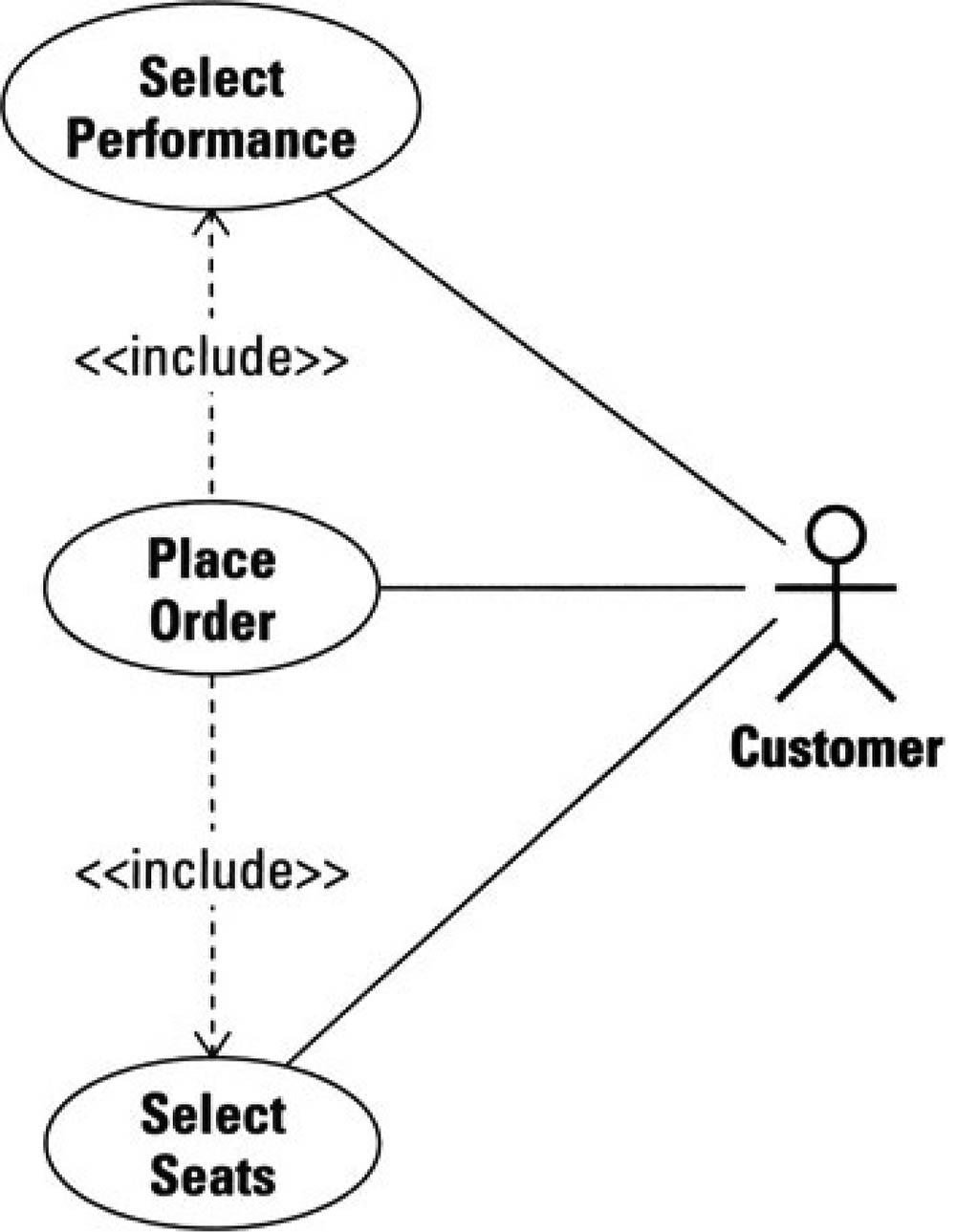
- Which use cases include other use cases
- The UML includes other relationships between use cases beyond the simple includes, such as extend.
Building the Use Case Diagram
View the diagram below to understand which steps are involved in building the use case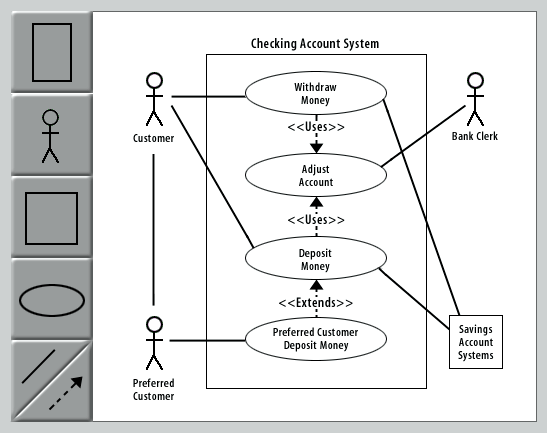
Here are the steps required to build the use case diagram:
In the next lesson, the use case narrative will be discussed.
- First, set the context of the target system. Click the System button to add the system icon to the diagram.
- Now double-click on the new system icon to add its name.
- Identify the actors. Click the Actor:person button to add actors.
- Double-click either actor to add its name.
- Click the Actor:system button to add another actor.
- Double-click the new actor to add its name.
- Identify the use cases. Add three use cases by clicking the Use Case button.
- Double-click on any use case to add its name.
- Define the associations between actors and use cases. Click the Association button to add associations connecting all the actors to their appropriate use cases.
- Evaluate the actors and use cases to find opportunities for refinement. Click the Actor:person button to add a Preferred Customer actor.
- Now click the Use Case button to add a Preferred Customer use case.
- Click the Association button to add an association connecting the new actor and use case.
- Evaluate the use cases to find opportunities for delegation. First, add associations between use cases by clicking the Association button.
- Now, double-click either new association to add the
<<Uses>>stereotype. - Evaluate the use cases for special cases. First, add associations between Deposit Money and Preferred Customer Deposit by clicking the Association button.
- Double-click on the new association to add the
<<Extends>>stereotype. - This completes the use case diagram.
Steps in building a use case diagram
Correct order of steps for building a use case diagram.
- Set the context of the target system. Context always comes first. Without it, there is no frame of reference for the information you are evaluating.
- Identify the actors. Find the people, systems, or devices that communicate with the system. These users will become your source for finding and validating the required features of the system. This should be a first-draft effort only.
- Identify the use cases. Find the features that the system provides. What does the system help the actor(s) do? What does the system tell the actor? What does the actor help the system do? This should be a first-draft effort only.
- Define the associations between actors and use cases. Identify which actors need access to which features. This should be a first-draft effort only.
- Evaluate the actors and use cases to find opportunities for refinement. Rename, merge, and split actors and use cases as needed. Update the related associations.
- Evaluate the use cases to find opportunities for delegation. Apply the
<<Uses>>association stereotype between the use cases. - Evaluate the actors and use cases for special cases. Apply the
<<Extends>>association stereotype.
Use Case diagram example
- Use Case diagram: A diagram that shows the relationships among actors and use cases (features) within a system.
- use case instance: The performance of a sequence of actions being specified in a use case.
- use case model: A model that describes a system's functional requirements in terms of use cases, use case narratives, and scenarios.
Build Use Case - Exercise
Click the Exercise link below to build the use case diagram for the course project.
Build Use Case - Exercise
Build Use Case - Exercise
